Featured Project 01 / Graphics / Systems
BLACK HOLE SIMULATION
Rust • OpenGL • GLSL • WebAssembly/WebGL2 • egui
Native + desktop web demo
Project insight
Overview
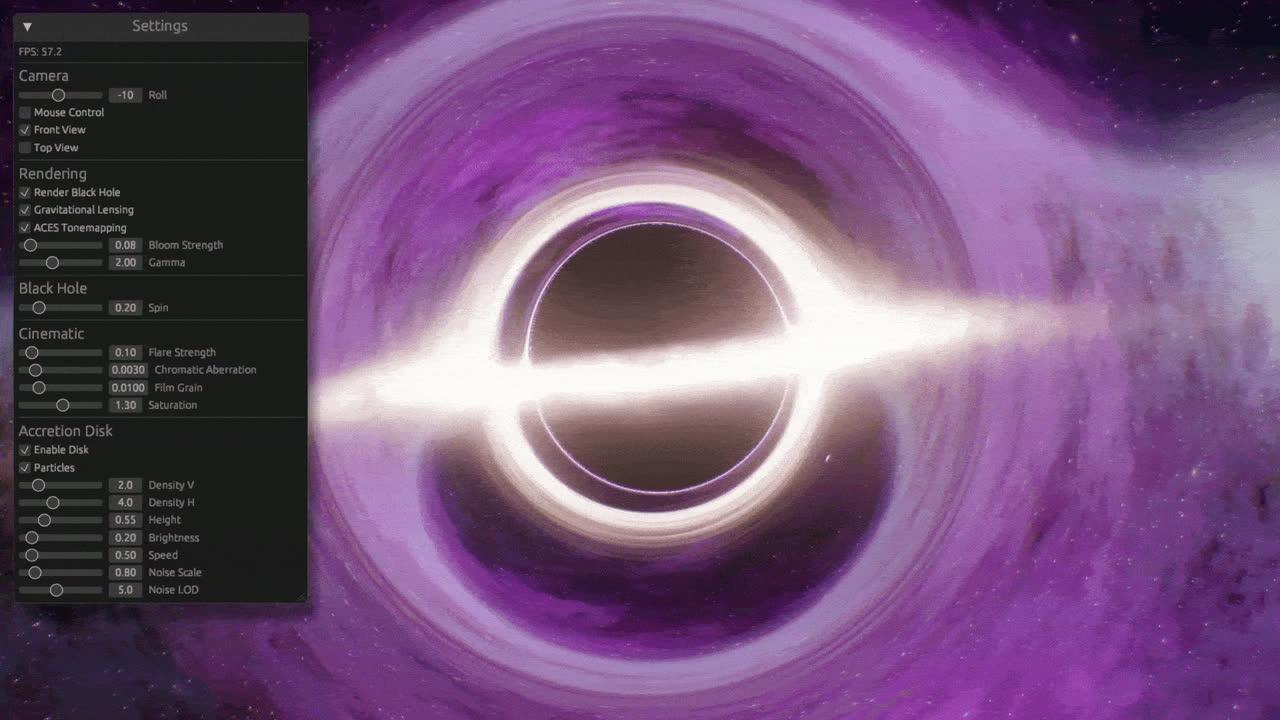
Black Hole Simulation is a stylized real-time renderer that visualizes a Kerr-like black hole approximation with interactive graphics controls.
Problem
The project explores how shader-based lensing and post-processing can produce an interactive black-hole visualization across native and browser targets.
My Contribution
Built the Rust renderer, custom GLSL shader pipeline, camera and rendering controls, and native and WebAssembly/WebGL2 targets.
Main Technologies
- Rust
- OpenGL
- GLSL
- WebAssembly
- WebGL2
- glow
- glutin
- winit
- egui
Key Technical Decisions
- Used custom GLSL shaders for the black-hole effect, bloom, lens flare, and tonemapping passes.
- Used glow with glutin and winit for OpenGL rendering and window/input handling.
- Maintained native and WebAssembly/WebGL2 targets so the renderer can run locally or in a browser.
Challenges and Solutions
- Supporting the same visual project across native and browser graphics environments.
- Separated platform setup from the shared rendering work and targeted OpenGL natively and WebGL2 through WebAssembly.
- Keeping a shader-heavy scene understandable while tuning its visual output.
- Added egui controls for camera, lensing, accretion-disk, bloom, and tonemapping settings.
Outcome
Published native and WebAssembly targets with a desktop browser demo, mouse/front/top/auto-orbit camera modes, and adjustable lensing, disk, and bloom settings.
Limitations / Verification Boundary
- A stylized Kerr-like approximation, not a geodesic solver or validated physics simulation.
- Native OpenGL uses HDR render targets; browser WebGL2 uses RGBA8, so effects and performance differ.
- The external demo is desktop-only and loads approximately 23 MB of WebAssembly; it is not an embedded mobile experience.
- There is no pause control in the renderer.